Invoice your clients and get paid online
for $10 a year
Simple invoicing software for freelancers, contractors, consultants, landlords and side businesses. Create a professional invoice, email it from CountAbout, and let your client pay by bank or card from a link in the email. Every payment lands in your books automatically.
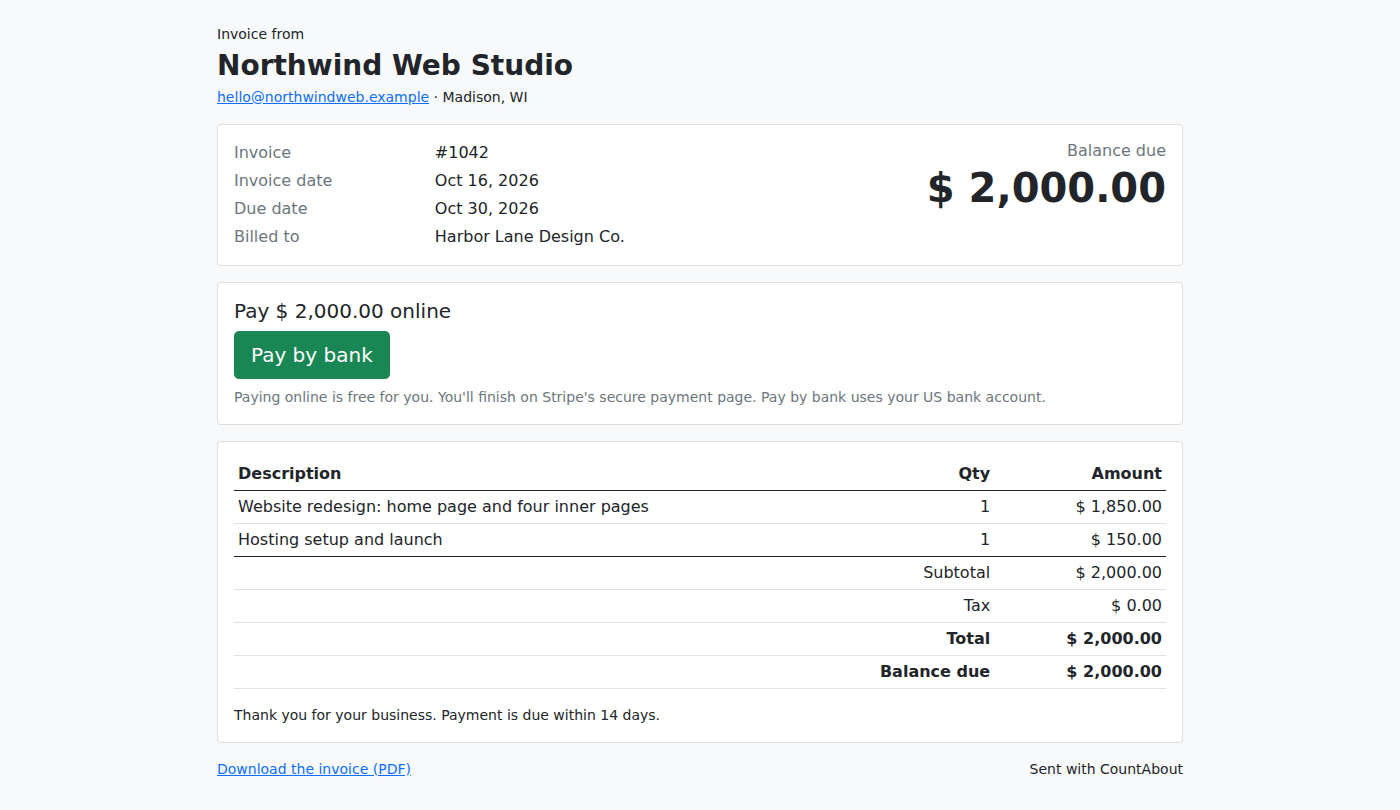
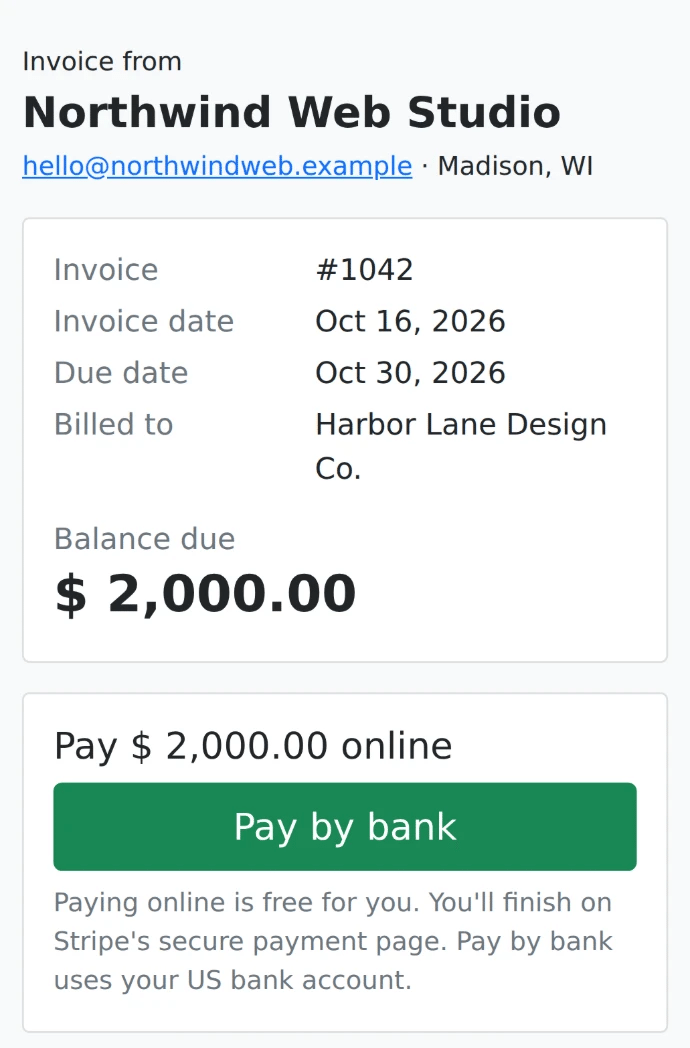
What your client sees: the invoice and a Pay by bank button. No account to create.
A low-cost alternative to QuickBooks and Quicken for invoicing
QuickBooks bundles invoicing into monthly accounting plans built for bigger businesses. Quicken puts it in its Business & Personal plans. CountAbout takes a simpler approach: invoicing is a $10-a-year add-on to a personal finance app, so you get invoices, online payments and the bookkeeping behind them, with your personal and business money in one place, for a fraction of what QuickBooks charges.
No per-invoice fees. No per-client limits. No contract. Cancel any time.
Simple invoicing software: three steps from invoice to paid
From a blank form to money in the bank, with the bookkeeping done for you along the way.
Create the invoice
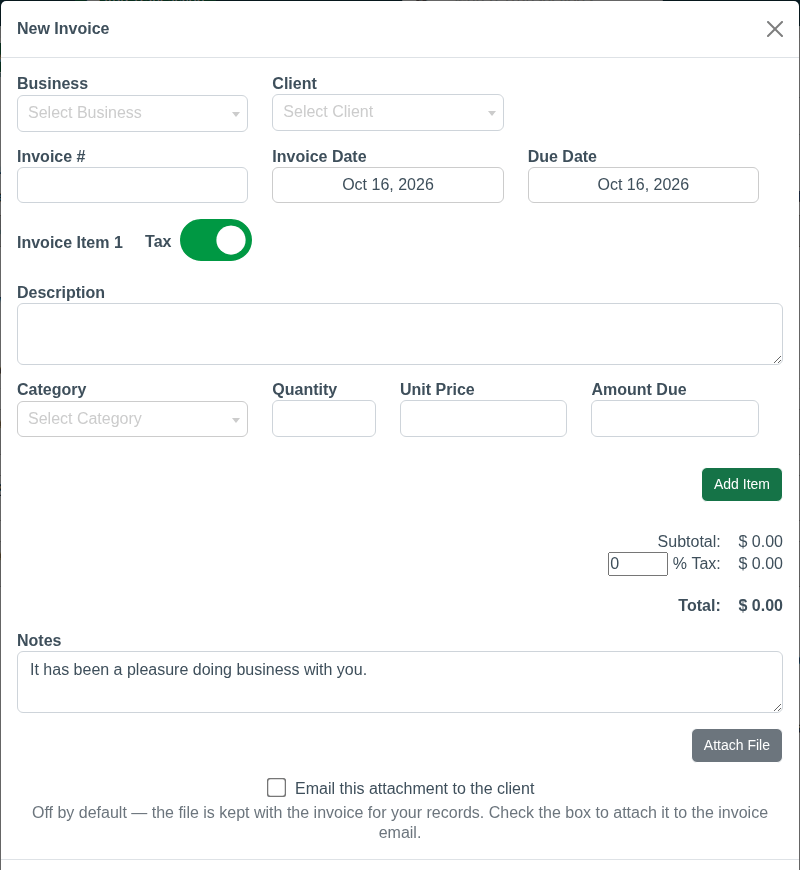
Pick the business and the client, add line items with a quantity and unit price, switch sales tax on if you need it, and add a note. Each line is tied to a CountAbout category, so the income lands in the right place.
Email it from CountAbout
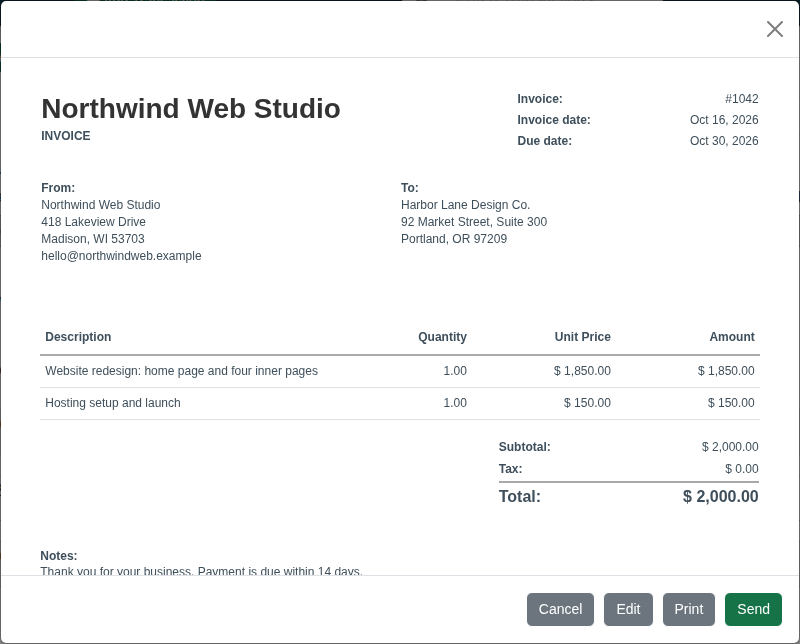
Preview the PDF, with your business name as the heading, and send it to your client straight from the app. The PDF is attached, and the email includes a View and pay online button.
Your client pays, your books update
Your client pays by bank account, or by card if you switch cards on for them, with no login. When the money arrives, CountAbout marks the invoice paid and records the payment and the processing fee for you.
A clean PDF invoice with your business name on top
Your business name and address, your client’s details, numbered line items with quantity and unit price, subtotal, optional sales tax, total and your notes. Attached to the email, ready to print or file.
Download a sample invoice (PDF) →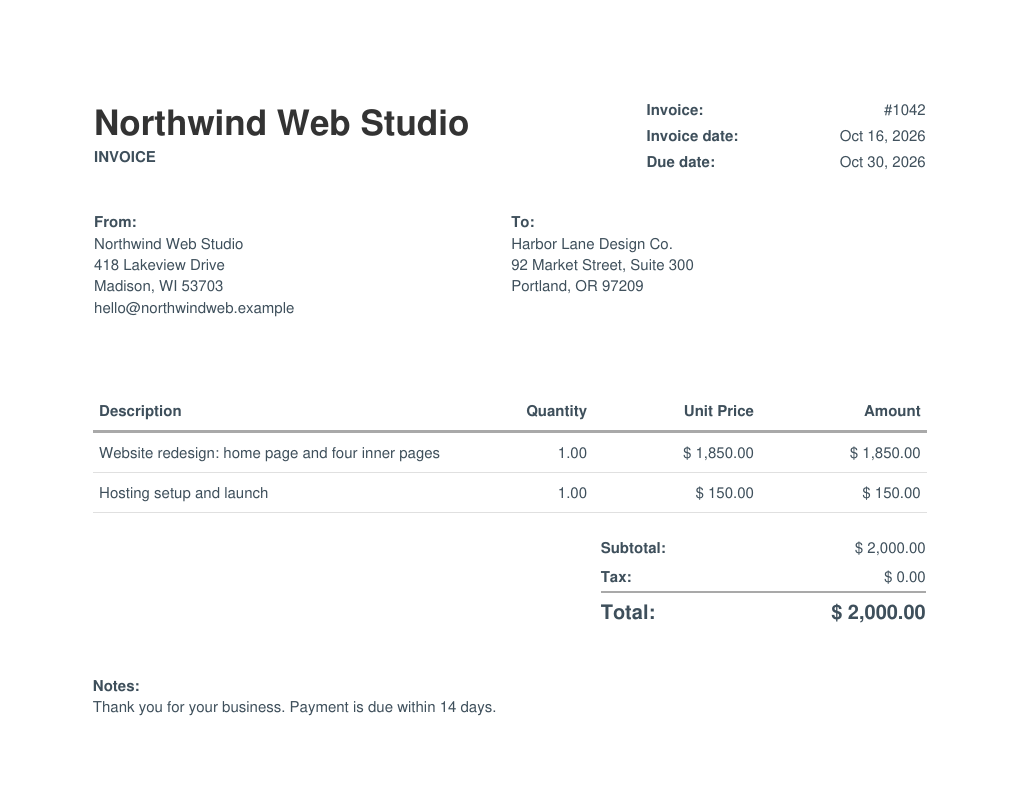
Invoice software for freelancers and small businesses, without the bloat
Everything you need to bill clients and keep clean books. Nothing you don’t.
Unlimited clients
Add as many clients as you like, each with an address and several contacts (name, email and phone). No per-client fees, ever.
More than one business
Run two businesses? Invoice under each one’s own name and address, all from the same CountAbout account.
Professional line-item invoices
Description, quantity and unit price on every line, optional sales tax, notes, an invoice number, an invoice date and a due date.
Every line tied to a category
Each line item belongs to a CountAbout category you choose, so your income is reported in the right place from the moment you bill.
PDF invoices, emailed from the app
Generate a PDF with your business name as the heading and email it to your client from CountAbout, PDF attached, with a View and pay online button.
Know what’s outstanding
The invoice list shows what’s paid, what’s open, and how many days late an overdue invoice is, so nothing slips through.
Deposits, partial payments and credits
Record a deposit, a partial payment, a payment in full or a credit against any invoice. The balance due updates as you go.
Bookkeeping done for you
Accounts receivable, the deposit into your bank account and the income category are recorded automatically. The invoice and the books are one system.
Invoice history per client
See every invoice you’ve sent a client, what they’ve paid and what’s still open, in one place.
See who owes you, and how late they are
The Invoices tab lists every outstanding invoice with its balance due and status, from “due in 14 days” to “9 days late”, with totals by how overdue they are. Switch to paid invoices with one click, or search by client.
Start free trial →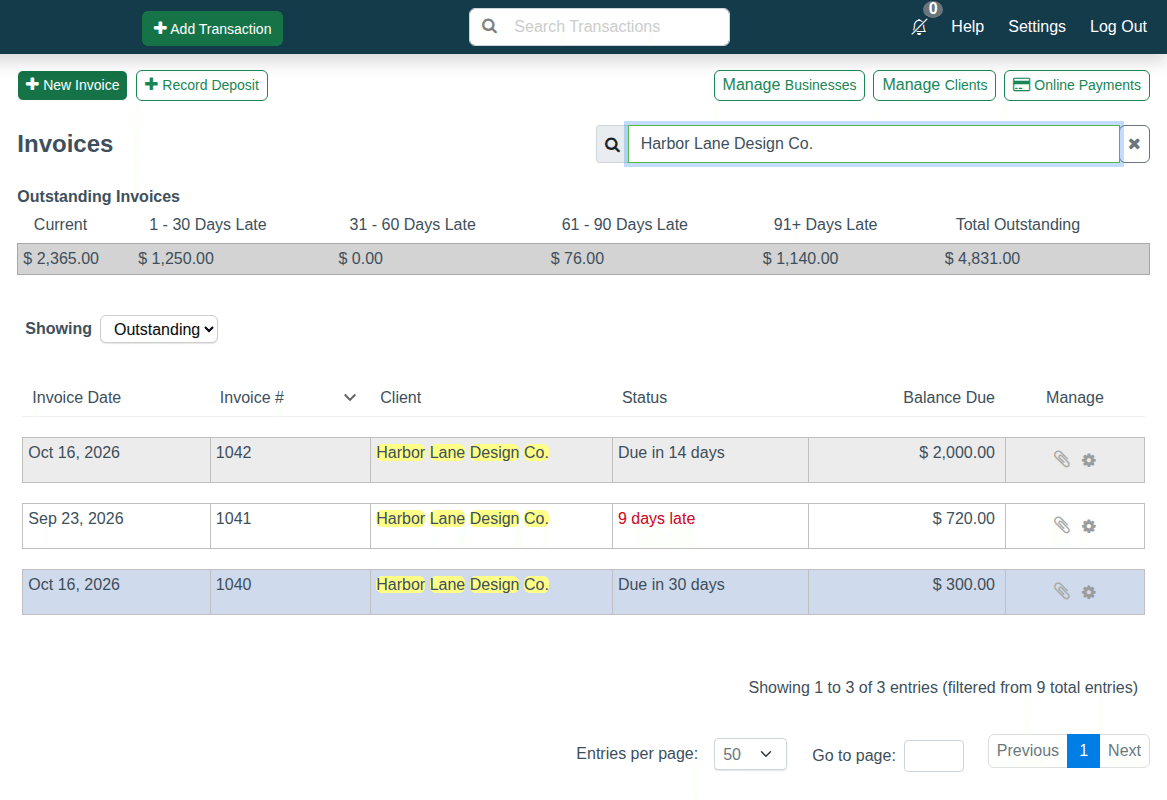
Invoice and get paid online, by bank or card
Every invoice email includes a View and pay online button. Your client opens a web page, sees the invoice, and pays. No account to create, no app to install.
- Pay by bank account (ACH) is on for every client. Switch on card payments for any client you choose.
- Money goes straight to your bank through Stripe. Connect your Stripe account from the Invoices tab under Online Payments. Setup takes a few minutes.
- Marked paid automatically. When the payment arrives, CountAbout marks the invoice paid and records the payment and the processing fee in your books.
- Your client always pays the invoice amount. The processing fee comes out of what you receive, at Stripe’s own rates. CountAbout adds nothing.
Online payment fees
| Payment method | Fee per payment | Example: a $2,000 invoice |
|---|---|---|
| Bank account (ACH) | The first 10 bank payments each calendar month are free. After that, 0.8% per payment, capped at $5.00. | $0.00 within your 10 free payments that month. Otherwise $5.00, because 0.8% would be $16.00 and the cap applies. |
| Card | 2.9% + $0.30 on every card payment. The 10 free payments a month apply to bank payments only. | $58.30 |
Fees are Stripe’s standard rates with nothing added by CountAbout, and are deducted from the amount you receive. Online payments are in US dollars only for now. A Stripe account is required; you connect it from the Invoices tab in a few minutes.
CountAbout vs QuickBooks vs Quicken for small business invoicing
If you need invoices, online payments and clean books, not a full accounting department, here is how the options stack up.
| CountAbout | QuickBooks Online | Quicken | |
|---|---|---|---|
| Invoicing cost | $10/year add-on. Basic plan plus invoicing from $29.99/year | Simple Start at $38/month, about $456/year*. The free plan allows 2 invoices a month | Included in the Business & Personal plans, priced per month and billed annually* |
| How you’re billed | Once a year. No contract, cancel any time | Monthly | Yearly, renews automatically |
| Personal and business money in one app | ✓ | ✗ Business books only | ✓ Business & Personal plans |
| Clients pay invoices online | ✓ Bank or card through Stripe, no CountAbout markup | ✓ QuickBooks Payments | ✓ Stripe, or PayPal links in Quicken Classic |
| Free trial | 45 days, no credit card, plus 15 days of invoicing free | 30 days | No free trial listed |
* Competitor details are taken from quickbooks.intuit.com and quicken.com on October 16, 2026, and may change. The QuickBooks figure is the Simple Start list price before promotional discounts. CountAbout is not a full accounting suite: there is no payroll, 1099 filing or inventory. If you need those, QuickBooks is the right tool. If you need invoices, online payments and clean books alongside your personal finances, CountAbout costs a fraction of the price.
Made for people who bill a few clients, not a few hundred
If QuickBooks feels like overkill and a spreadsheet feels like a risk, CountAbout invoicing is the middle ground.
Freelancers & consultants
Bill by the project or by the hour, get paid by bank transfer, and keep business income separate from personal spending in one app.
Contractors & trades
Invoice a deposit before you start, record progress payments as the job goes, and apply the final payment when the work is done.
Landlords
Invoice tenants or property clients, see who is late at a glance, and keep rental income in the same app that tracks your Schedule E activity.
Side businesses
Turn a side income into a real business with professional invoices and online payments, for the price of one lunch a year.
Simple, honest pricing: $10 a year for invoicing
Add invoicing to any CountAbout plan. Every new account can try invoicing free for 15 days from the Invoices tab, no card needed.
- Unlimited clients and invoices
- Several businesses, each with its own name and address
- PDF invoices emailed from the app
- Online payments by bank or card
- Stripe’s rates, no CountAbout markup
- Deposits, partial payments and credits
- Books updated automatically
- Enter transactions and import QIF files
- Unlimited accounts and categories
- Budgeting tools and reports
- Projected Register Balance
- Schedule C & E tracking
- Multi-User Access included
- Everything in Basic
- Automatic bank and credit card downloads
- US and international banks
- Auto categorization rules
- Investment account balance tracking
- Multi-User Access included
Every plan includes a 45-day free trial of CountAbout with no credit card required. Online payment processing fees are Stripe’s standard rates (see above) and are deducted from what you receive. Online payments are in US dollars only for now. See all plans and pricing →
Invoicing and online payments FAQ
How much does CountAbout invoicing cost?
$10 a year, added to any CountAbout subscription. Try it free for 15 days from the Invoices tab, with no card needed.
How do my clients pay?
From a link in the invoice email. They open a web page, see the invoice and pay by bank account or by card, with no account to make.
What are the fees for online payments?
Stripe’s own rates, with nothing added by CountAbout. Bank (ACH) payments: the first 10 each calendar month are free, then 0.8% per payment, capped at $5. Card payments: 2.9% + $0.30 on every card payment; the 10 free a month applies to bank payments only. Your client always pays the invoice amount; the fee comes out of what you receive.
Do I need a Stripe account?
Yes. You connect one from the Invoices tab, under Online Payments, in a few minutes. Payments go straight to your bank through Stripe.
Is it only for US businesses?
Online payments are in US dollars only today. Invoicing itself works in any currency CountAbout supports.
Does it do my bookkeeping?
Every invoice, deposit and online payment is recorded in your CountAbout books automatically, in the categories you choose. Accounts receivable, the deposit into your bank account and the income category are handled for you.
Can I run more than one business?
Yes. Each business has its own name and address on its invoices, all from one CountAbout account.
Is there a limit on clients or invoices?
No. Add as many clients and send as many invoices as you need. There are no per-client or per-invoice fees.
I already use CountAbout. How do I turn invoicing on?
Open the Invoices tab in the app and start your 15-day free trial. After the trial, invoicing is $10 a year on top of your subscription.
Is there a contract?
No. CountAbout subscriptions and the invoicing add-on are billed once a year, and you can cancel at any time.
Start invoicing today
Try CountAbout free for 45 days, then add invoicing and online payments for $10 a year. Already a CountAbout user? Turn on your 15-day invoicing trial from the Invoices tab.
Start Your Free TrialNo credit card required · Cancel any time · Online payments in US dollars only for now